Serverless RAG in minutes using AWS Bedrock Knowledge Bases and S3 Vectors
Updated in December 2025 as some service integrations and CloudFormation resources became available.
Introduction
S3 Vectors are a cost-effective and quick way to get started with RAG if you can tolerate sub-second query latency. By pairing it with Amazon Bedrock Knowledge Bases and Data Sources, we can build a serverless and fully managed RAG pipeline with minimal operational overhead.

What is RAG?
Retrieval Augmented Generation (RAG) is a proven technique to enhance Large Language Models (LLMs) by providing them with relevant context from external sources. Instead of relying solely on the model training data, RAG:
- Retrieves relevant documents from an external knowledge base
- Augments the LLM prompt with the retrieved context
- Generates a response enhanced by the provided information
Similarity search (also called vector search or semantic search) is at the core of RAG, and it works by converting (using an embedding model) both documents and queries into high-dimensional vectors called embeddings, where semantically similar text produces “similar” vectors. For example, the query “How do I return an item?” would match closely with a document chunk about “Returns and Exchanges Policy” even if they use different words, because their semantic meaning is similar. We typically store this kind of data into specialized data stores called vector databases.
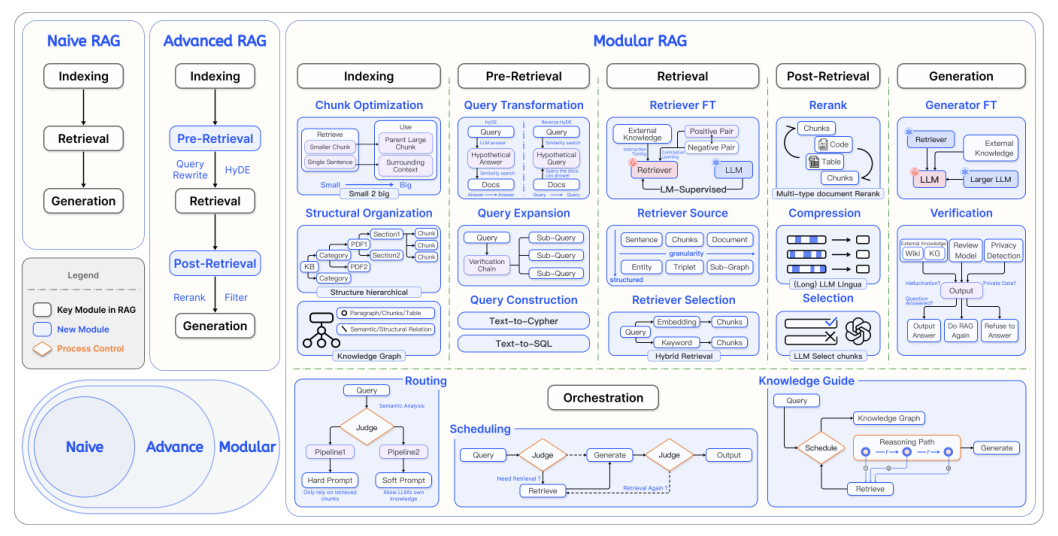
As this diagram (from this paper) shows, RAG optimization techniques can quickly become a rabbit hole. For this example, we’ll keep things simple and stick to the basics.
The Vector Store
Traditional vector databases are usually optimized for low latency, however they come with ongoing operational costs. S3 Vectors is ideal where sub-second latency is acceptable, or where cost optimization takes priority.
Creating the S3 Vector Bucket is remarkably simple, as it just provides the foundation for organizing the vector data into indexes, which will then enable similarity searches across large datasets.
KBVectorBucket:
  Type: AWS::S3Vectors::VectorBucket
The next step is to create one (or more) Vector Index, which requires some configuration:
VectorIndex:
  Type: AWS::S3Vectors::Index
  Properties:
    VectorBucketArn: !GetAtt VectorBucket.VectorBucketArn
    IndexName: !Sub "${AWS::StackName}-index"
    DataType: float32
    Dimension: 1024
    DistanceMetric: cosine
    MetadataConfiguration:
      NonFilterableMetadataKeys:
        - AMAZON_BEDROCK_TEXT
        - AMAZON_BEDROCK_METADATA
Let’s analyze some of those fields while paying attention to the fact that for using the vector store in a Bedrock Knowledge Base, there are some requirements to be followed.
DataType is the type of the vectors to be inserted into the index, and currently only float32 is supported, while the Dimension of the vectors will depend on the embedding model. Here are some examples:
Titan G1 Embeddings - Text: 1,536
Titan V2 Embeddings - Text: 1,024, 512, and 256
Cohere Embed English: 1,024
Cohere Embed Multilingual: 1,024
For most text embeddings, a cosine DistanceMetric is usually fine.
MetadataConfiguration is very important in this case. You can attach metadata as key-value pairs to each vector, which by default is always filterable. This means that it can be used in similarity search queries to filter by some kind of condition. S3 Vectors have a strict limit of 2KB per vector, which seems totally fine until you realize that:
AMAZON_BEDROCK_TEXTstores the actual text chunkAMAZON_BEDROCK_METADATAadds system metadata
It is clear that just AMAZON_BEDROCK_TEXT would be enough to exceed the limit
for text-rich documents, so we must configure those fields as
NonFilterableMetadataKeys, otherwise the data ingestion will fail.
The Knowledge Base
The Bedrock Knowledge Base is the layer that ties everything together, providing a unified API for ingestion and retrieval.
KnowledgeBase:
  Type: AWS::Bedrock::KnowledgeBase
  DependsOn: KnowledgeBaseRole
  Properties:
    Name: !Sub "${AWS::StackName}-kb"
    KnowledgeBaseConfiguration:
      Type: VECTOR
      VectorKnowledgeBaseConfiguration:
        EmbeddingModelArn: !Sub arn:aws:bedrock:${AWS::Region}::foundation-model/${EmbeddingModelId}
    RoleArn: !GetAtt KnowledgeBaseRole.Arn
    StorageConfiguration:
      Type: S3_VECTORS
      S3VectorsConfiguration:
        IndexArn: !Ref VectorIndex
        VectorBucketArn: !GetAtt VectorBucket.VectorBucketArn
Here we configure the Knowledge Base to use the S3 Vector bucket and index we just created for storage, and Amazon Titan V2 for serverless embedding generation. Note that the vector Dimensions must match throughout the entire pipeline.
The Knowledge Base will require IAM permissions to invoke the embedding model, read from the data source buckets, and read/write vectors to S3, which we will add in the full template.
The Ingestion Pipeline
The Data Source is where documents enter the RAG ingestion pipeline. It defines which data to ingest, how to parse and chunk it. You could decide to handle some or all of those steps manually, but this is the easiest way to get started.
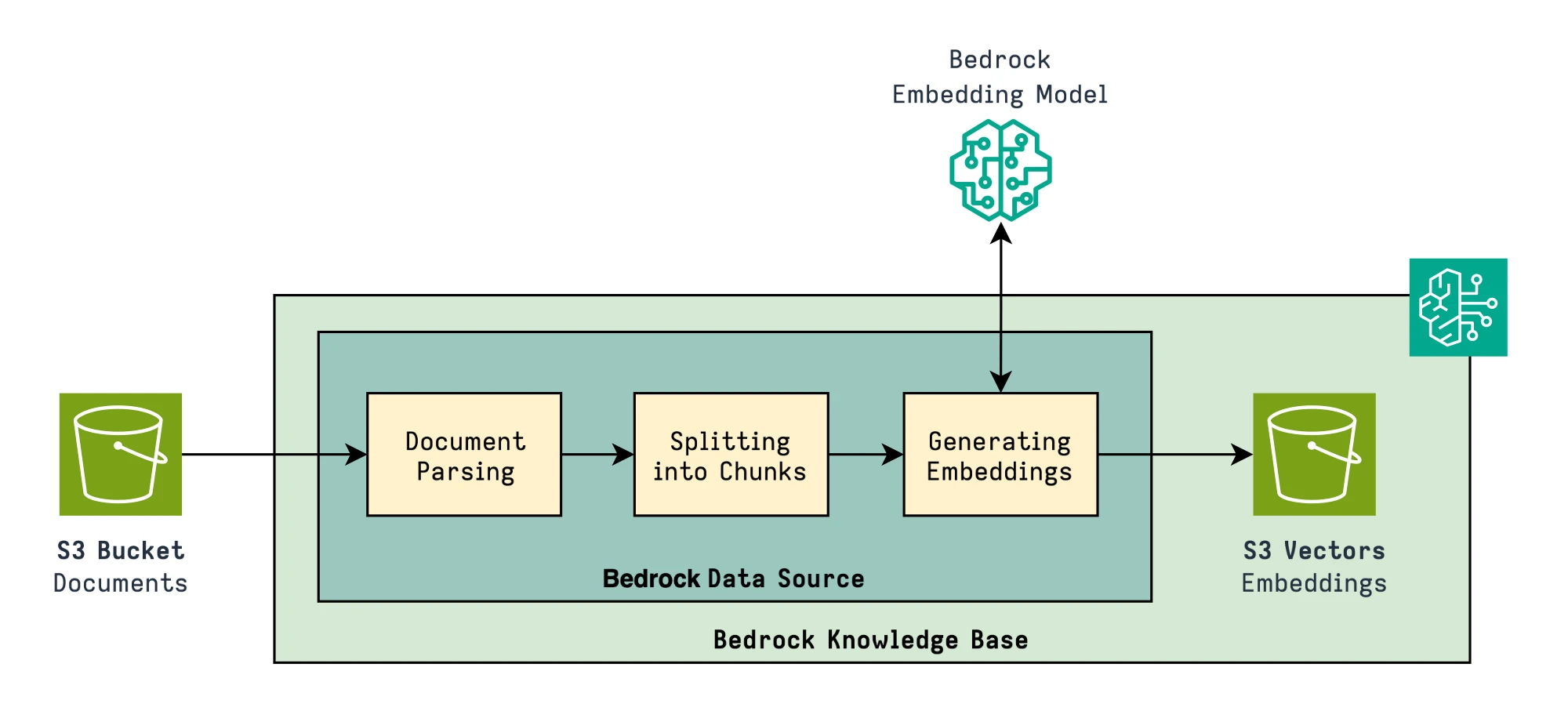
Let’s take a look at the CloudFormation Resource:
DataSource:
  Type: AWS::Bedrock::DataSource
  Properties:
    DataDeletionPolicy: RETAIN
    KnowledgeBaseId: !Ref KnowledgeBase
    Name: !Sub "${AWS::StackName}-source"
    DataSourceConfiguration:
      Type: S3
      S3Configuration:
        BucketArn: !GetAtt DataBucket.Arn
    VectorIngestionConfiguration:
      ChunkingConfiguration:
        ChunkingStrategy: HIERARCHICAL
        HierarchicalChunkingConfiguration:
          LevelConfigurations:
            - MaxTokens: 1500
            - MaxTokens: 300
          OverlapTokens: 60
Besides basic configuration and the RETAIN policy, which persists S3 Vectors
even after the data is deleted from the source bucket, the Chunking
configuration is the most interesting part.
Chunking Strategies
Chunking is the process of splitting large documents into smaller pieces, and the chunking strategy plays a big role in how the RAG solution ultimately performs.
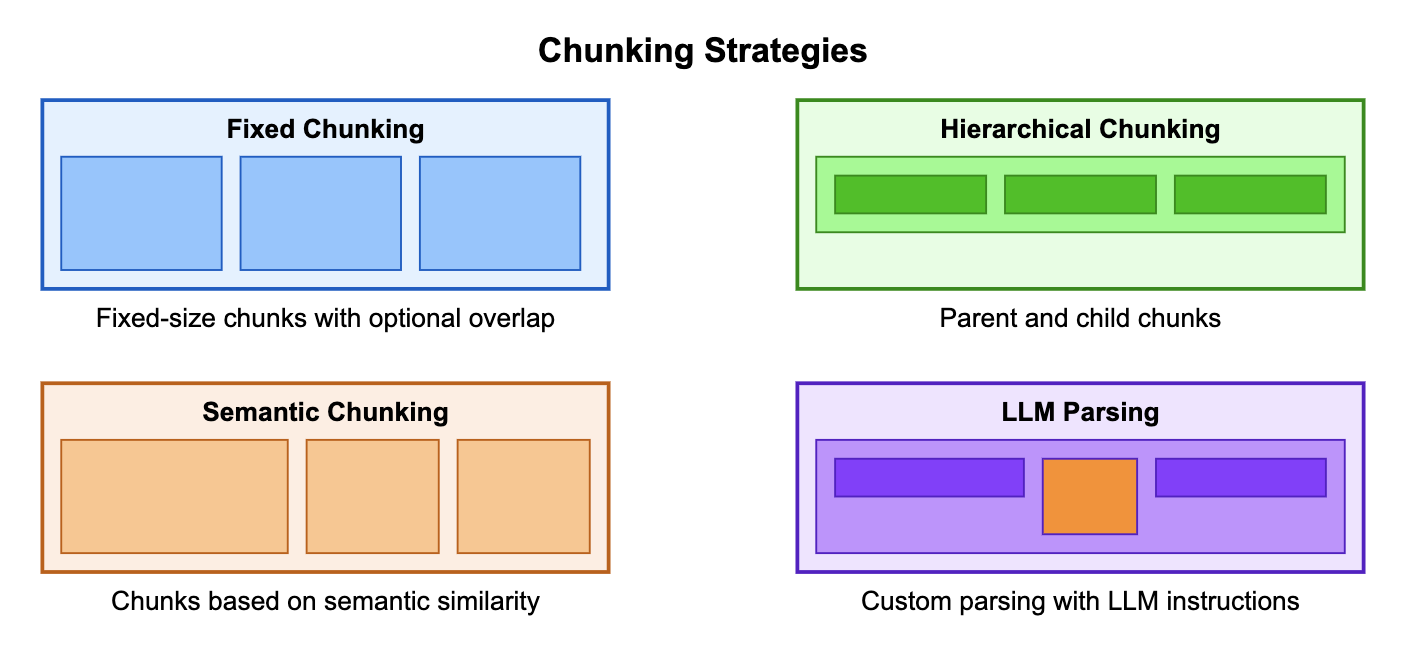
Diagram from AWS Samples
This decision will also influence the Retrieval part of the system. While smaller chunks can be beneficial for precision and retrieval accuracy, they often lack sufficient context on their own, so we must then use techniques to expand those chunks with the surrounding information before passing them to the LLM.
NONE
ChunkingConfiguration:
  ChunkingStrategy: NONE
Each file on S3 is treated as a single chunk. Tthis is often used when you pre-process the documents yourself before uploading.
FIXED_SIZE
ChunkingConfiguration:
  ChunkingStrategy: FIXED_SIZE
  FixedSizeChunkingConfiguration:
    MaxTokens: 512
    OverlapPercentage: 10 # 10% overlap = 51 tokens overlap
Each chunk will have the same length, without semantic awareness, while the overlap creates some redundancy between adjacent chunks, which will help a little when the split happens mid-sentence.
This is most useful for smaller bits of information, like for FAQs or prototyping.
SEMANTIC (Context-Aware Splitting)
ChunkingConfiguration:
  ChunkingStrategy: SEMANTIC
  SemanticChunkingConfiguration:
    MaxTokens: 512
    BufferSize: 1
    BreakpointPercentileThreshold: 95 # Dissimilarity threshold for splitting
This technique will use embeddings to detect semantic boundaries between topics, and is an improvement over FIXED_SIZE as it will try to split at topic transitions.
Semantic chunking is useful for narrative content (blog posts, articles), documents with distinct topic transitions, and where preserving topic coherence is critical.
HIERARCHICAL
ChunkingConfiguration:
  ChunkingStrategy: HIERARCHICAL
  HierarchicalChunkingConfiguration:
    LevelConfigurations:
      - MaxTokens: 1500 # Parent chunks - full context
      - MaxTokens: 300 # Child chunks - precise search
    OverlapTokens: 60 # Number of tokens to repeat across chunks in the same layer
In this case the documents will be split into two layers of chunks, the first containing large chunks, and the second smaller ones dericed from the first layer.
This is often good for long technical documents, research papers, articles, and in general content where the surrounding context could significantly affect the interpretation.
Parsing Strategies
Before chunking, documents must also be parsed, converting PDFs or other formats into clean text. Bedrock offers three parsing modes:
- Default Parser: basic and fast processing at no additional charges, supports only text
- Bedrock Data Automation: managed parsing which also allows for multimodal data
- Foundation Model Parser: uses LLMs to intelligently parse content with custom prompts
In this example, we will use the Default Parser with Hierarchical chunking.
The full template
# template.yaml
AWSTemplateFormatVersion: 2010-09-09
Description: >
  Simple RAG pipeline with Amazon Bedrock Knowledge Bases and S3 Vectors.

Parameters:
  EmbeddingModelId:
    Type: String
    Default: amazon.titan-embed-text-v2:0
    Description: "The Id of the Bedrock model used to generate embeddings."

Resources:
  VectorBucket:
    Type: AWS::S3Vectors::VectorBucket
    Properties:
      VectorBucketName: !Sub "${AWS::StackName}-vectors-${AWS::AccountId}"

  VectorIndex:
    Type: AWS::S3Vectors::Index
    Properties:
      VectorBucketArn: !GetAtt VectorBucket.VectorBucketArn
      IndexName: !Sub "${AWS::StackName}-index"
      DataType: float32
      Dimension: 1024
      DistanceMetric: cosine
      MetadataConfiguration:
        NonFilterableMetadataKeys:
          - AMAZON_BEDROCK_TEXT
          - AMAZON_BEDROCK_METADATA

  KnowledgeBase:
    Type: AWS::Bedrock::KnowledgeBase
    DependsOn: KnowledgeBaseRole
    Properties:
      Name: !Sub "${AWS::StackName}-kb"
      KnowledgeBaseConfiguration:
        Type: VECTOR
        VectorKnowledgeBaseConfiguration:
          EmbeddingModelArn: !Sub arn:aws:bedrock:${AWS::Region}::foundation-model/${EmbeddingModelId}
      RoleArn: !GetAtt KnowledgeBaseRole.Arn
      StorageConfiguration:
        Type: S3_VECTORS
        S3VectorsConfiguration:
          IndexArn: !Ref VectorIndex
          VectorBucketArn: !GetAtt VectorBucket.VectorBucketArn

  DataBucket:
    Type: AWS::S3::Bucket
    Properties:
      BucketName: !Sub "${AWS::StackName}-data-${AWS::AccountId}"

  DataSource:
    Type: AWS::Bedrock::DataSource
    Properties:
      DataDeletionPolicy: RETAIN
      KnowledgeBaseId: !Ref KnowledgeBase
      Name: !Sub "${AWS::StackName}-source"
      DataSourceConfiguration:
        Type: S3
        S3Configuration:
          BucketArn: !GetAtt DataBucket.Arn
      VectorIngestionConfiguration:
        ChunkingConfiguration:
          ChunkingStrategy: HIERARCHICAL
          HierarchicalChunkingConfiguration:
            LevelConfigurations:
              - MaxTokens: 1500
              - MaxTokens: 300
            OverlapTokens: 60

  KnowledgeBaseRole:
    Type: AWS::IAM::Role
    Properties:
      RoleName: !Sub "${AWS::StackName}-role"
      AssumeRolePolicyDocument:
        Version: "2012-10-17"
        Statement:
          - Effect: Allow
            Principal:
              Service: [bedrock.amazonaws.com]
            Action: ["sts:AssumeRole"]
      Policies:
        - PolicyName: BedrockInvokeModel
          PolicyDocument:
            Version: "2012-10-17"
            Statement:
              - Sid: BedrockInvokeModelStatement
                Effect: Allow
                Action:
                  - "bedrock:InvokeModel"
                Resource: !Sub arn:aws:bedrock:${AWS::Region}::foundation-model/${EmbeddingModelId}
        - PolicyName: S3Vectors
          PolicyDocument:
            Version: "2012-10-17"
            Statement:
              - Sid: S3VectorsStatement
                Effect: Allow
                Action:
                  - "s3vectors:GetIndex"
                  - "s3vectors:QueryVectors"
                  - "s3vectors:PutVectors"
                  - "s3vectors:GetVectors"
                  - "s3vectors:DeleteVectors"
                Resource: !Ref VectorIndex
                Condition:
                  StringEquals:
                    aws:ResourceAccount: !Ref "AWS::AccountId"
        - PolicyName: S3DataSource
          PolicyDocument:
            Version: "2012-10-17"
            Statement:
              - Sid: S3ListBucket
                Effect: Allow
                Action:
                  - "s3:ListBucket"
                Resource: !GetAtt DataBucket.Arn
                Condition:
                  StringEquals:
                    aws:ResourceAccount: !Ref "AWS::AccountId"
              - Sid: S3GetObject
                Effect: Allow
                Action:
                  - "s3:GetObject"
                Resource:
                  - !Sub "arn:aws:s3:::${DataBucket}/*"
                Condition:
                  StringEquals:
                    aws:ResourceAccount: !Ref "AWS::AccountId"

Outputs:
  KnowledgeBaseId:
    Value: !Ref KnowledgeBase
    Description: "Bedrock Knowledge Base ID"
  DataSourceId:
    Value: !Ref DataSource
    Description: "Bedrock Data Source ID"
  DataBucketName:
    Value: !Ref DataBucket
    Description: "S3 bucket for Knowledge Base documents"
After deploying the stack, we can upload some documents to the S3 bucket and start an ingestion job:
aws bedrock-agent start-ingestion-job \
  --knowledge-base-id $KB_ID \
  --data-source-id $DS_ID
After the process is complete, we can run a test query through:
aws bedrock-agent-runtime retrieve-and-generate \
  --input '{"text":"What's the memory bandwidth of the NVIDIA H100?"}' \
  --retrieve-and-generate-configuration '{
    "type":"KNOWLEDGE_BASE",
    "knowledgeBaseConfiguration":{
      "knowledgeBaseId":"'$KB_ID'",
      "modelArn":"arn:aws:bedrock:eu-central-1::foundation-model/anthropic.claude-3-5-sonnet-20240620-v1:0"
    }
  }'
And here is the output, showing which references have been retrieved to generate the response:
{
  "citations": [
    {
      "generatedResponsePart": {
        "textResponsePart": {
          "span": {
            "end": 287,
            "start": 0
          },
          "text": "The NVIDIA H100 PCIe GPU has a peak memory bandwidth of 2,000 GB/s (gigabytes per second). This is the world's highest PCIe card memory bandwidth, which allows for faster processing of large models and massive data sets, ultimately speeding up time to solution for demanding applications."
        }
      },
      "retrievedReferences": [
        {
          "content": {
            "text": "Table 1. Product Specifications  Specification NVIDIA H100 Product SKU P1010 SKU 200 [...]",
            "type": "TEXT"
          },
          "location": {
            "s3Location": {
              "uri": "s3://rag-simple-data-1234567890/PB-11133-001_v01.pdf"
            },
            "type": "S3"
          },
          "metadata": {
            "x-amz-bedrock-kb-source-file-modality": "TEXT",
            "x-amz-bedrock-kb-document-page-number": 7.0,
            "x-amz-bedrock-kb-data-source-id": "SMJ3FGLPOC"
          }
        },
        {
          "content": {
            "text": "PB-11133-001_v02 | November 2022  NVIDIA H100 PCIe GPU  Product Brief [...]",
            "type": "TEXT"
          },
          "location": {
            "s3Location": {
              "uri": "s3://rag-simple-data-1234567890/PB-11133-001_v01.pdf"
            },
            "type": "S3"
          },
          "metadata": {
            "x-amz-bedrock-kb-source-file-modality": "TEXT",
            "x-amz-bedrock-kb-document-page-number": 5.0,
            "x-amz-bedrock-kb-data-source-id": "SMJ3FGLPOC"
          }
        }
      ]
    }
  ],
  "output": {
    "text": "The NVIDIA H100 PCIe GPU has a peak memory bandwidth of 2,000 GB/s (gigabytes per second). This is the world's highest PCIe card memory bandwidth, which allows for faster processing of large models and massive data sets, ultimately speeding up time to solution for demanding applications."
  },
  "sessionId": "a2d990c8-9fdd-45a2-9be5-931d7b871ade"
}
Just by adding a UI on top of this, we will have a simple, serverless and cost-effective RAG solution.